Installation
The Biocapture SDK is currently distributed as ZIP file. Please acquire the latest distribution files from your contact at Biocapture. A more flexible distribution method will be available in the future.
Unpack the SDK ZIP File
The Biocapture SDK delivery ZIP file includes a Sample App project with the embedded Android SDK.
The Biocapture SDK (sdk-release.aar) is located in the aars folder of the
Sample App project or in the sdk folder of the provided ZIP.
Embed into an Android Project
The Biocapture SDK is written in Java and Kotlin. It is thereby naturally compatible with both programming languages.
You can either start off with a blank project, for which the necessary steps are provided below, or use the Sample Project (Sample App) that is bundled with the SDK. The Sample App is preconfigured and ready to use. The necessary steps are provided below.
Integration
Copy the files sdk-release.aar and core-release.aar into the libs folder of your
module (<project-root>/<module-name>/aars). The two files can be found in
the bcm-sdk-sample/aars folder of the Sample App project or in the sdk folder of the provided
ZIP.
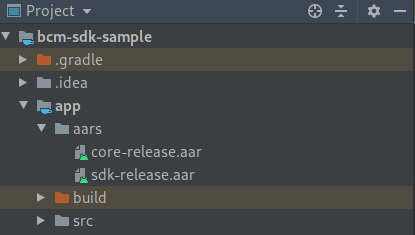
Open build.gradle from your app module, add the sdk-release.aar and the core-release.aar as a
dependency and tell gradle to search the aars folder, like in the code below.
The other dependencies are also required by the Biocapture SDK.
Do not forget to set the compileOptions in the android part of the gradle file.
repositories {
    flatDir {
        dirs 'aars'
    }
}

android {
    ...
}

dependencies {
    api(name: 'core-release', ext: 'aar') {
        transitive = true
    }

    api(name: 'sdk-release', ext: 'aar') {
        transitive = true
    }


    // app compat and UI things
    implementation "androidx.appcompat:appcompat:1.2.0-alpha01"
    implementation "androidx.fragment:fragment:1.2.0"

    implementation "androidx.multidex:multidex:2.0.1"

    // tools
    implementation "com.fasterxml.jackson.core:jackson-databind:2.10.0"
}
It is mandatory to add the jackson-databind dependency. The library is
used for the licensing and activation part of the Biocapture SDK.
Permissions
The Biocapture SDK doesn't work without the camera. Required permissions are linked automatically by the SDK.
The following permissions are optional:
<uses-permission android:name="android.permission.VIBRATE"/>
Note: On devices running Android Marshmallow (6.0) and above, the SDK automatically asks for
the Camera permission in the Scan Fragment.
Use getRequiredPermissions() to get a list of all required permissions.
BcmScanFragment.getRequiredPermissions()
Architecture
You may olimit which architectures are used by setting abiFilters.
Note: The abiFilters command in the ndk closure affects the Google Play Store filtering.
defaultConfig {
        ndk {
            abiFilters "arm64-v8a"
        }
}
The apk can be split based on the architecture if multiple apks should be uploaded to the Google Play Store. Google Play Store manages the delivery of the necessary apk for each target device.
splits {
    abi {
        enable true
        reset()
        include "arm64-v8a"
        universalApk false
    }
}
Note: You get an UnsatisfiedLinkError, if the app and the CPU architecture do not match.